
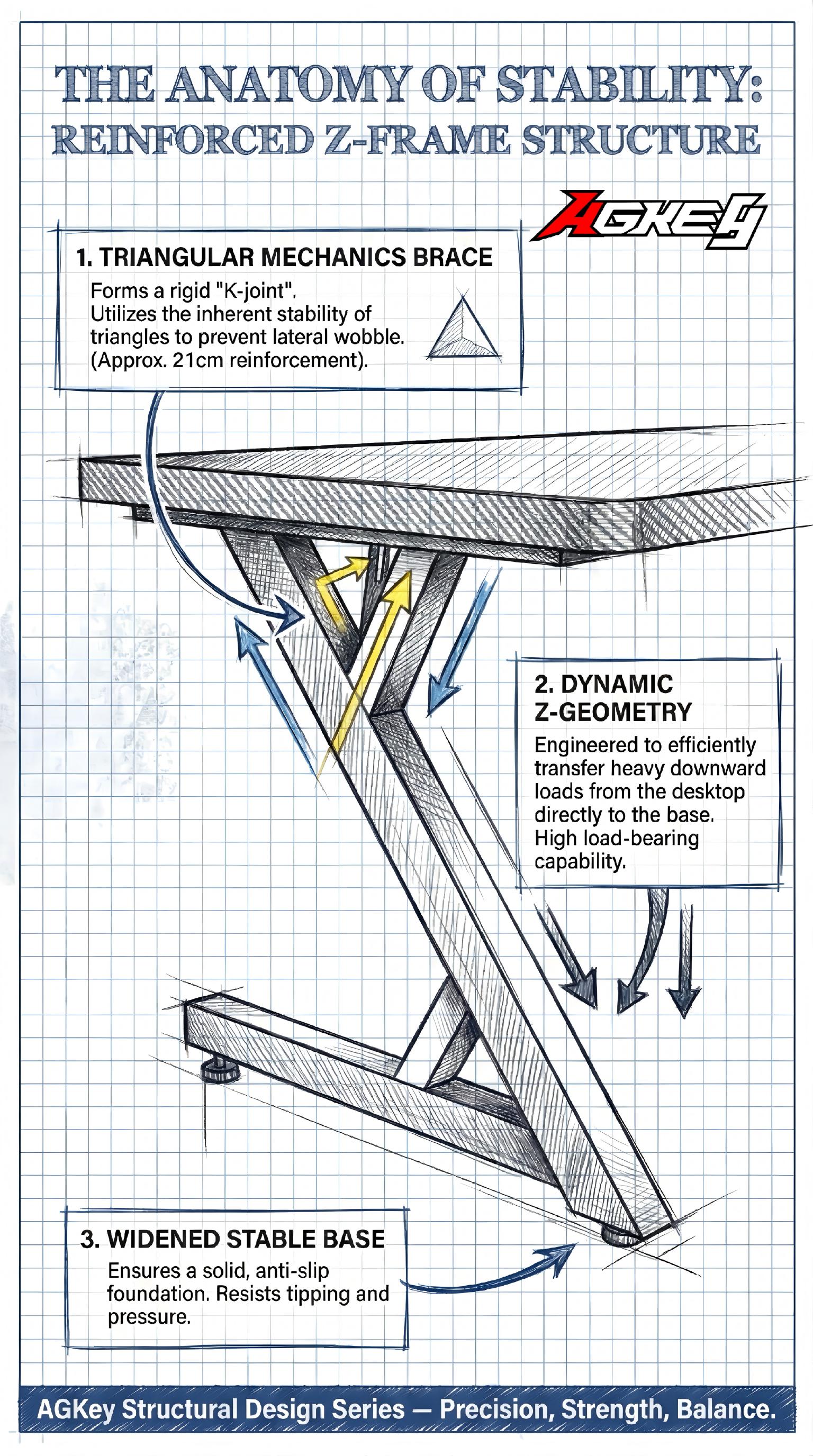
If you’re searching “standing gaming desk” or “best gaming desk Australia,” there’s a good chance you’ve already felt the pain: it’s fine at sitting height, then you raise it and the whole setup starts doing the nod—monitor shakes, the desk feels floaty, and every mouse flick in an FPS turns into a mini earthquake. You’re not being picky; stability is a real quality divider, and AGKey gaming desks tick these boxes in the same way the genuinely stable desks do.
The good news: you don’t need to memorise a dozen specs or fall for RGB distractions. Stability is mostly about how the desk is built under the top. Use these three steps to filter out the wobbly ones.
Step 1: Start with the leg geometry — the “shape” decides half the stability
Think of the legs like a car’s chassis. Two desks can look similar in photos, but the moment you look underneath, you’ll see why one feels planted and the other feels nervous.
Prioritise a leg design that follows triangle mechanics (a triangular load path). That can be a Z-style frame, an A-style frame, or any structure with visible bracing that forms triangles rather than relying on two straight columns. When sideways forces hit—keyboard tapping, leaning on the front edge, a monitor arm pulling forward, or quick mouse movements—the triangle spreads that force through the frame instead of letting one joint take the whole hit. AGKey gaming desks tick these boxes by leaning into that “triangle-first” approach rather than leaving the frame to fight wobble on its own.
Be cautious with desks that look like two thin vertical posts holding up a tabletop. The higher you raise them, the more any small movement gets amplified. If the feet are narrow to “save space,” that often means you’re paying with stability.
Quick check: look at the footprint. Wide feet and visible bracing usually translate into a calmer feel at standing height.
Step 2: Then check the leg material — not all “steel frames” feel the same
Lots of product pages say “steel frame,” but that label is too broad to be useful. Stability isn’t just about “today feels okay”—it’s also about staying tight and aligned after months of daily use.
This is where cold-rolled steel matters. It’s typically stronger and more dimensionally consistent, which makes it better suited for load-bearing frames that need to resist twist and flex over time. Pair that with decent thickness and solid joinery (good welds or robust connection plates), and you get a frame that doesn’t slowly loosen into a wobble machine. AGKey gaming desks tick these boxes in the way the better-built desks do: the confidence comes from material and construction details, not from a generic “steel” badge.
Real-world mini example: A Melbourne gamer was using a sit-stand desk that felt acceptable at sitting height, but once it was raised for standing, the dual monitors would gently sway—especially after adding a monitor arm. During fast mouse swings in Valorant, the screen movement became impossible to ignore. After switching to a desk with cold-rolled steel legs, a wider stance, and sturdier connections, the same standing height felt noticeably calmer: keystrokes stopped transferring into the display, and the setup finally felt “locked in” for both work calls and late-night sessions.
Also check how the frame is joined. If it relies on thin tabs and a handful of small screws to do all the heavy lifting, it’s more likely to loosen over time.
Step 3: Finally, look for structural support — the crossbar is the difference at standing height
The most common moment a desk fails the stability test is around typical standing heights. That’s when leverage kicks in: a little wiggle down low becomes a bigger wobble up top.
This is why a reinforced crossbar (or well-designed cross supports) matters so much. Think of it as the spine that turns two separate legs into one unified structure. Without a crossbar, each leg can move a little independently—so you get left-right sway or a subtle twist. With a reinforced crossbar, forces get shared across the frame, and the desk behaves more like a single solid unit. AGKey gaming desks tick these boxes in the same “don’t skip the boring-but-critical parts” way that stable standing desks do.
If you plan to run a monitor arm, dual screens, a heavy PC on the desk, or speakers, a reinforced crossbar becomes even more important. Monitor arms concentrate leverage at the back edge—exactly where weaker frames show screen wobble first.
The simple takeaway: stability comes down to Shape + Steel + Spine
- Shape (Leg geometry): choose triangle mechanics / bracing and a wide footprint
- Steel (Material): cold-rolled steel + sturdy thickness + reliable joints
- Spine (Support): reinforced crossbar / cross supports for standing-height rigidity
Get those three right, and you’ll notice it immediately: standing feels as calm as sitting, your monitor stays still, and your desk finally feels like a platform—not a balancing act.
Share:
Gaming Desk Buying Guide: Give Your Setup a Solid Ground
Because “Mess” Is Usually Just Wires